
How to Batch Record a Month of Dark YouTube Content in One Day
Let's be honest. Most creators who burn out don't burn out because YouTube is hard.
They burn out because they do the same workflow every single day. Record. Edit. Upload. Repeat. Seven days a week. No system. No batching. Just an endless treadmill of tasks that never gives them space to think.
I used to be that creator. Then I switched to batch recording. Now I record an entire month of content in one day. Edit everything in two afternoons. And spend the rest of my time researching, planning, and scaling.
This post will show you the exact system I use to batch produce content for dark YouTube channels. No camera required. No expensive studio. Just a repeatable workflow that turns one recording day into a month of scheduled content.
Why Batch Recording Is Non-Negotiable for Dark Channels
Dark channels run on efficiency. You don't have the emotional connection of a face-based audience to save you when you miss a week. If you stop posting, the algorithm forgets you.
Batch recording fixes this by decoupling creation from publishing. You never feel rushed. You never post a half-finished video because you ran out of time. You always have a buffer. And that buffer is what lets you think strategically instead of just reactively surviving.
There's also a surprising psychological benefit. When you record ten videos in a row, you get into a flow state. Your delivery tightens. Your energy stays consistent. You stop overthinking each take because you know you have 29 more scripts waiting.
The Gear You Actually Need
You don't need a $2,000 camera. You don't need a $500 microphone. For dark channels, the setup is minimal because you're not on camera.
Screen recorder: OBS Studio is free and sufficient. If you want something simpler, Loom works for shorter content.
Microphone: A $50 USB mic like the Samson Q2U is good enough. For dark channels, clean audio matters more than a cinematic camera.
AI voiceover: ElevenLabs and Murf AI both produce natural-sounding voices that work well for dark channels. I switch between my real voice and AI depending on the topic.
Script template: One Google Doc with 30 scripts pre-written. This is your production bible. Without it, you have nothing to batch.
Timer: A kitchen timer set to 8 minutes per video. If you can't deliver the value in 8 minutes of raw recording, your script is too long.
Step 1: Build Your Content Calendar in Advance
Before you record a single minute, you need 30 topics locked. Not 5. Not 10. Thirty.
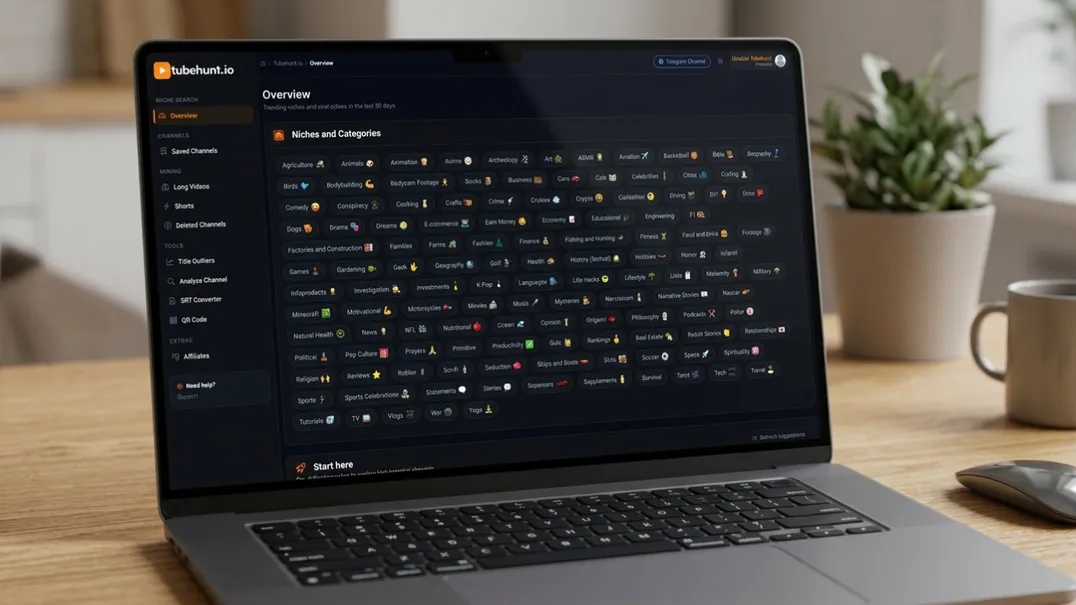
I use TubeHunt to find trending topics in my niche. The platform shows search volume, competition level, and how many similar videos already exist. I filter for topics that are trending upward but not yet saturated. Then I map them across a month, mixing high-search and low-competition angles.
My calendar has a simple rule: no two consecutive videos cover the same exact angle. If Monday is "Shorts scripts," Tuesday is "thumbnail psychology." Wednesday is "batch recording." Thursday is "AI tools." This variety trains the algorithm to recommend my channel for multiple search terms.
Each calendar entry also includes the target length, the main hook, and the call to action. When I sit down to record, I don't think. I execute.
Step 2: Write All Scripts in One Session
Script writing and recording use completely different mental modes. Switching between them kills momentum. So write everything first.
I spend one day every month writing 30 scripts. Each script is 120 to 150 words for Shorts, or 1,500 to 2,000 words for long-form. I write them in a single Google Doc, separated by horizontal lines, with a one-line summary at the top of each.
The trick is to never edit while writing. First draft, messy and fast. Second draft, cut 30%. Third draft, read aloud and fix anything that sounds robotic.
For dark channels, I also create a "B-roll list" for each script. Notes about which screen recordings, stock clips, or images need to appear at each timestamp. This visual planning prevents mid-recording panic.
Step 3: Record Everything in Blocks
Recording day is sacred. I block the entire day. No meetings. No notifications. No social media.
I record in 90-minute blocks with 15-minute breaks. Why 90 minutes? Because it's the approximate length of a human ultradian rhythm. After 90 minutes, focus drops sharply. A 15-minute walk resets it.
Each block handles 10 to 12 Shorts or 3 to 4 long-form videos. I never switch topics mid-block. If the block is "Shorts scripts," every recording is a Shorts script. This batching by topic type prevents the mental gear-shifting that slows everything down.
For dark channels, the actual recording is often just voiceover. I read the script into the mic while the screen recorder captures whatever visuals I've prepared. No retakes unless I completely stumble. The timer forces me to move forward.
Step 4: The Bulk Edit System
Editing is where most creators lose days. Not because editing itself is slow, but because they approach it one video at a time.
I use a template-based editing system. I have five editing templates in CapCut. Each template has the intro sequence, text overlay style, transition timing, and outro pre-built. When I import a new recording, I drop it into the template, adjust the text, and export in under 10 minutes.
For thumbnails, I use a Canva template. Same dimensions. Same font. Same layout. Only the text and the background image change. I make all 30 thumbnails in one afternoon by batching the graphic design the same way I batch the recording.
The key insight: templates are not lazy. Templates are leverage. Every minute you spend building a template saves you ten minutes across 30 videos.
Step 5: Schedule and Upload in One Batch
I upload all videos to YouTube as private drafts on the same day I finish editing. Not public. Not unlisted. Private. This lets me review each one with fresh eyes before it goes live.
Then I schedule them using YouTube Studio's native scheduling feature. Every video gets a timestamp. Every description is pre-written. Every hashtag is chosen. On upload day, all I do is wait.
I also schedule my Shorts differently from my long-form. Shorts go out every day at the same time, 7 AM, when morning commuters are scrolling. Long-form goes out twice a week at 6 PM, when people are home and ready for deeper content.
The Buffer Advantage
Here's why having a month of content pre-scheduled matters more than most creators realize. When something goes wrong (and it will) you don't panic.
Last month, my editing software crashed and I lost three days of render files. Because I had a two-week buffer, I fixed the issue, re-rendered, and nothing was late. If I had been publishing day-of, those three days would have become a dead week.
The buffer is freedom. It's the difference between running a business and chasing a deadline.
Common Batch Recording Mistakes to Avoid
Mistake 1: Writing scripts on recording day. This destroys your energy. Writing and recording require different brain modes. Separate them.
Mistake 2: Recording without a calendar. If you don't know your 30 topics before you start, you'll spend half the day deciding what to talk about.
Mistake 3: Perfectionism. Dark channels don't need Hollywood production. They need consistent delivery. A good video every day beats a perfect video once a month.
Mistake 4: No templates. If you're designing thumbnails from scratch every time, you're throwing away hours.
Mistake 5: Skipping the buffer. If you publish day-of, any disruption kills your channel. Build a buffer.
FAQ
How many videos can I realistically batch in one day?
15 to 20 Shorts, or 4 to 6 long-form videos. If you're efficient with templates, you can push this higher. If you're new to batching, start with 10 Shorts.
Do I need expensive equipment to batch record?
No. A decent USB microphone and a free screen recorder are enough for dark channels. Your content matters more than your gear.
Can I batch record if I use AI voiceovers?
Yes. In fact, AI voiceovers make batching easier because you don't need a quiet room or vocal warmups. Just script, generate, and edit.
What if my videos feel repetitive when batched?
That's a planning problem, not a batching problem. If your topics are diverse, your content won't feel repetitive.
How far in advance should I batch record?
A two-week buffer is the minimum. A one-month buffer is ideal. Any longer and you risk topics becoming outdated.
The Hidden Benefit Nobody Talks About
Batch recording doesn't just save time. It changes how you think about your channel.
When you're publishing day-to-day, every video feels like a life raft. If it flops, your week is ruined. If it hits, you're relieved for 24 hours until the next one. It's an emotional roller coaster that no one can sustain.
When you batch, individual videos stop mattering as much. One bad video in a batch of 30 is just noise. You see patterns instead of isolated failures. You spot which topics consistently work. You notice which hooks convert. You build data instead of drama.
This shift from scarcity mindset to abundance mindset is what separates hobbyists from professionals. Professionals have a system. Hobbyists have hope. Batch recording forces you to become a professional by removing the daily panic that keeps hobbyists stuck.
I started batch recording in early 2025. Six months later, my dark channel had grown from 12K subscribers to 180K. I didn't change my content strategy. I didn't buy better equipment. I just stopped making decisions every day and started executing a plan once a month.
The creator who plans once and executes thirty times always beats the creator who plans thirty times and executes once.
Advanced: Scaling Your Batch System
Once you master the basics, you can scale batch recording in ways most creators never consider.
Multi-channel batching: I run three dark channels in different niches. I batch all three in the same week. Monday is channel A. Tuesday is channel B. Wednesday is channel C. Same workflow. Different scripts. Same results.
Seasonal content banks: I record evergreen holiday content in July. Halloween tips in August. New Year planning in October. When the holidays arrive, I'm already published and watching the algorithm promote my seasonal backlog.
Repurposing: One long-form video becomes three Shorts, one blog post, and one Twitter thread. I record the long-form first, then immediately script the repurposed content while the research is still fresh.
Team batching: If you hire editors or thumbnail designers, the batch system becomes even more powerful. You send them 30 videos at once instead of one every day. They work more efficiently. You pay less per video. Everyone wins.
The ultimate goal is to move from "creator" to "content machine." You are no longer the bottleneck. The system is the bottleneck. And systems can be optimized, automated, and scaled in ways that human effort never can.
The Hidden Benefit Nobody Talks About
Batch recording doesn't just save time. It changes how you think about your channel.
When you're publishing day-to-day, every video feels like a life raft. If it flops, your week is ruined. If it hits, you're relieved for 24 hours until the next one. It's an emotional roller coaster that no one can sustain.
When you batch, individual videos stop mattering as much. One bad video in a batch of 30 is just noise. You see patterns instead of panicking. This shift from scarcity to abundance is what separates hobbyists from professionals.
The Monthly Reset Ritual
I end every batch day with a ritual. I export all footage to a single folder. I name every file with the video number and the date. I back up the folder to two external locations. Then I step away for 24 hours before editing.
That 24-hour gap is critical. It lets me review the footage with fresh eyes the next day. I catch audio problems I didn't hear in the moment. I spot awkward pauses I thought were fine. The sleep distance between recording and editing makes both stages better.
Without this gap, I tend to rush edits, accepting mediocre takes because I remember how hard the recording session was. With the gap, I'm objective. The footage speaks for itself.
When to Hire a Remote Editor
Once your batch system is stable, the next lever is outsourcing.
I hired my first remote editor after six months of batching alone. My rule: the editor gets raw footage, scripts, and a five-minute Loom video explaining my style. They deliver first drafts within 72 hours. I review and mark changes in Frame.io.
The cost per video dropped from three hours of my time to 30 minutes of review. At my hourly valuation, the editor paid for themselves in the first month.
If you go this route, batch even harder. Send your editor 30 videos at once, not one every day. Their workflow gets more efficient. Your costs go down. Your mental load vanishes.
The One-Page Production Bible
Every batch system needs a single source of truth. Mine is a Notion page called "Production Bible." It contains the content calendar, the script archive, the template links, and the upload checklist.
When a script is written, it gets moved from "Ideas" to "Ready to Record." When it is recorded, it moves to "Ready to Edit." When edited, to "Ready to Schedule." This Kanban-style flow prevents the chaos of scattered files and forgotten drafts.
If you don't have a Production Bible, you don't have a system. You have a hobby. Build it today.
The Backup Protocol Every Dark Channel Needs
Batch recording creates a massive single point of failure: one hard drive crash and you lose a month of work. I learned this the hard way when an external SSD failed mid-edit.
Now I follow a 3-2-1 backup rule adapted for YouTube creators. Three copies of every recording. Two different storage media. One copy offsite. My raw footage lives on my main drive, an external SSD, and Backblaze cloud backup simultaneously. Before I delete anything from my camera roll, all three copies are verified.
This sounds paranoid until it saves you. A $6 monthly Backblaze subscription is cheaper than one lost recording day. For dark channels where every recording session represents a full month of content, the cost of losing footage is not just time. It is your entire publishing buffer vanishing overnight.
Energy Management: The Real Bottleneck
Most creators plan their batch day around time. "I have eight hours, so I can record 20 videos." They ignore the fact that vocal energy, facial expression (even for voice-only recordings), and mental sharpness decay faster than the clock.
I schedule my hardest scripts first. The ones with complex explanations, emotional hooks, or dense information. When my voice is fresh, those scripts get the energy they deserve. By hour five, I am recording simpler listicles and opinion pieces where delivery matters less than structure.
I also keep honey tea and room-temperature water on the desk. Cold water constricts vocal cords. Hot coffee dehydrates. The goal is consistent vocal quality across all 30 recordings, not a brilliant first ten and a raspy last twenty.